Premier Trial
Every new MTMPRO account starts on the Free plan with 30 days of Premier's tools switched on, so you can try them on real customers before you pay for anything. This page covers what the trial includes, where you see the days left, what changes when it ends, and how to keep Premier.
What the trial is
On day one, few shops know whether they need a master measurement form or a second check before orders go out. The trial lets you find out with your own customers and orders. For 30 days from the day you sign up, your account has Premier's tools on top of everything the Free plan already gives you.
You do not need a card to start, and nothing is charged when the trial ends. If you do nothing, the Premier tools switch off on day 30 and you carry on using MTMPRO on the Free plan.
What the trial includes
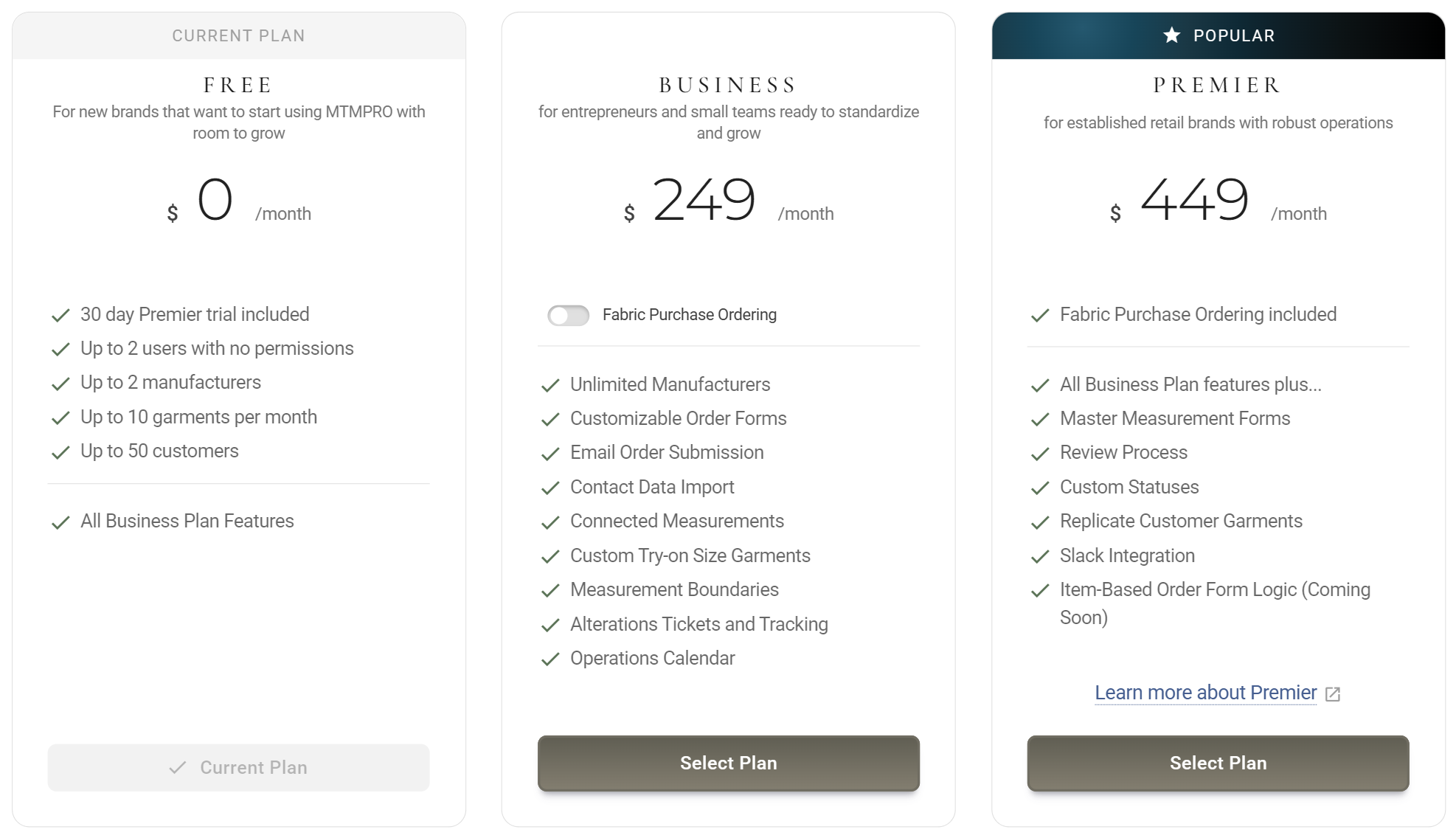
Premier is the Business plan plus tools for shops with a team, more than one manufacturer, or a lot of repeat orders. The trial switches these on:
- Master Measurements A customer who orders a jacket from one maker and trousers from another should only be measured once. Master Measurements keeps one set of measurements per customer, apart from any garment, and Connected Measurements can copy it into every garment they order. Build the form in Settings / Master Measurements, opens in MTMPRO, then measure your next returning customer on it. See Master Measurements.
- Review Process A second pair of eyes before an order goes to the manufacturer. Your team marks garments Ready for Review and the reviewers you choose are told. It is already switched on when the trial starts, so add your reviewers in Settings / Review Process, opens in MTMPRO. See Review Process.
- Custom statuses Your workroom has its own steps, such as at the presser or second fitting booked. Add your own statuses, rename them, put the list in your order, colour-code it and add dividers to break it up, in Settings / Garment Statuses, opens in MTMPRO. System statuses keep their names. See Garment Statuses.
- Garment replication A groom wants the same navy suit his best man ordered last spring. The Replicate tab in an order's Add Garments panel copies a garment, fabric included, from any customer's order history, using the measurements of the customer in front of you. See Replicating Garments.
- Slack Integration Your shop's news in a Slack channel as it happens: customers, orders, garments, fabric and support updates, with a morning summary of what is due. The owner connects it in Account / Slack, opens in MTMPRO. See Slack Integration.
Not part of the trial
These are not switched on during the trial:
- Item logic Greying out single options that another answer rules out. In the Form Builder it shows a Premier tag until you move to Premier. See Item Logic and Conflicts.
- Fabric Purchase Ordering Included with Premier, and a paid add-on on Business, but not switched on during the trial. See CMT Fabric Orders.
- Premier's monthly credits AI image renders and Aria credits stay at the Free plan's monthly amount during the trial. Premier's larger allowance starts when you move to Premier. See AI Renders.
The Free plan's limits still apply
The trial adds tools, not room. From day one your account has the limits on the Free card: Up to 2 users with no permissions, Up to 2 manufacturers, Up to 10 garments per month and Up to 50 customers. When the month's garments run out, the bar at the top of the page says so and Add Garments is greyed out until the next month or until you move to a paid plan.
Where you see it
From the first day, a dark card near the top right of every page counts down the days left. It goes down by one each day and reads 1 on the last day.

The number of days left, with a ring that empties as the month goes. Get the most out of Premier opens this page. Not shown on a phone, though the trial runs just the same.
The first line on the Free card. The Premier card has a Learn more about Premier link to this page.
During the trial your Feature Tier reads Free, and the next bill date is the day the trial ends. Only owners see this tab.
When it ends
Thirty days after you signed up, the trial ends by itself. Nothing is charged and nothing is deleted. You stay on the Free plan, with the Business plan's features and the Free plan's limits. The trial card goes from the top of the page; the Free Tier card stays.
Switches off
- The Master Measurements button on customers and orders.
- The review process, and with it the Mark for Review button on orders.
- Your own statuses in the status menus, and changes to the list: adding, renaming, reordering and colours.
- The Replicate tab in Add Garments.
- Posts to your Slack channel.
Stays as it was
- Every customer's master measurements, kept for when you move to Premier.
- Garments already in one of your own statuses stay in it, and the statuses are saved for when you move to Premier.
- Your Slack connection. Posts start again on Premier without connecting again.
- Your customers, orders and order forms, and every Business feature.
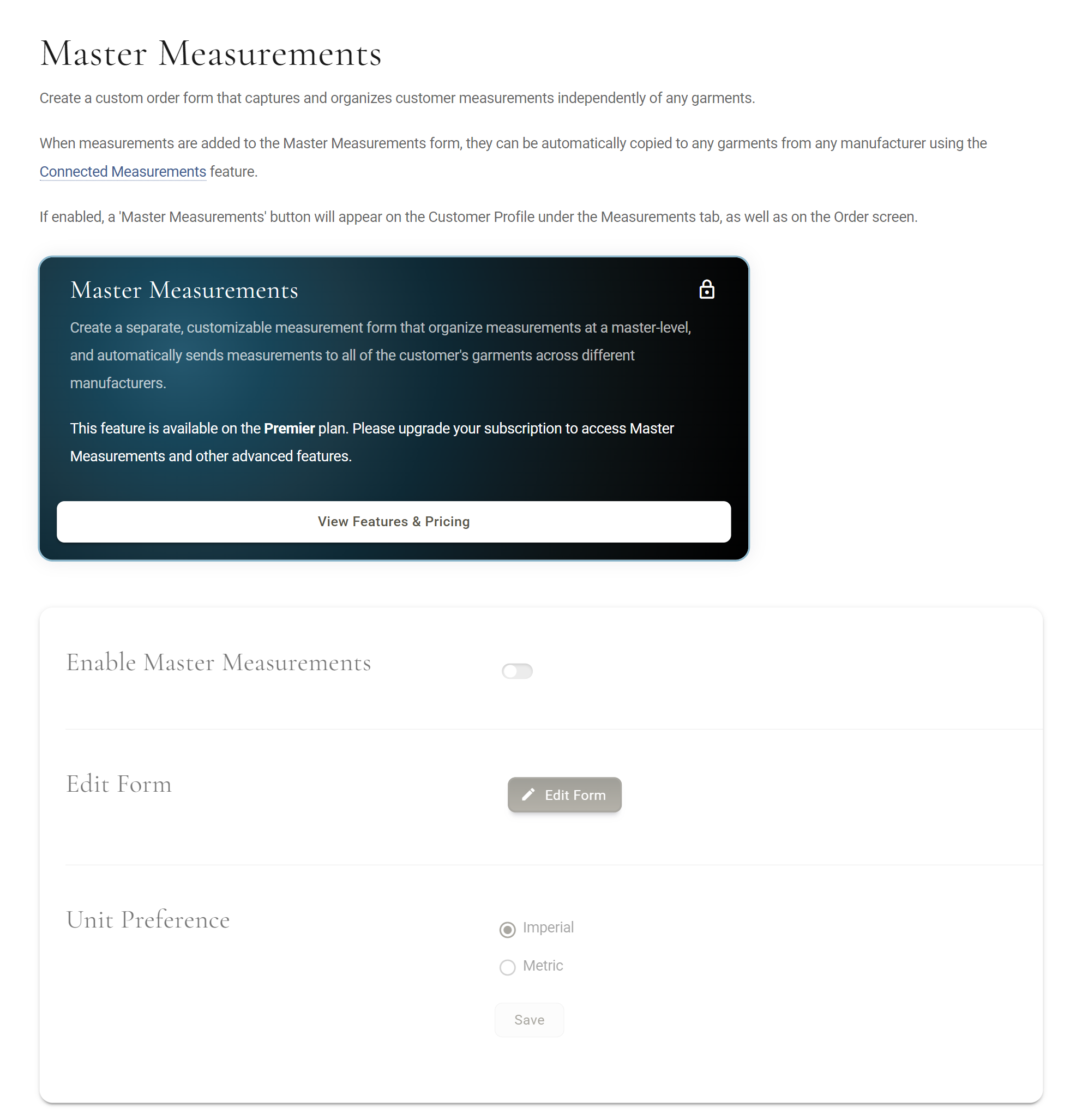
In the Settings menu, an arrow beside Master Measurements, Purchase Orders, Garment Statuses and Review Process marks what your plan does not include. The Replicate tab carries the same arrow.
What happens to your statuses
Your own statuses are a Premier tool, so the list goes back to standard when the trial ends. Your work is kept. Say your workroom added Fitting Booked and At the Presser during the trial and recoloured a few of the standard statuses:
- The list goes back to standard The standard MTMPRO statuses return with their standard colours, order and which ones are switched on. A standard status you had deleted is added back.
- Garments stay where they are A garment already in Fitting Booked stays in it, with its name, colour and history. The status menus offer only the standard statuses.
- Your own statuses are saved They are listed in Settings / Garment Statuses, opens in MTMPRO below the standard ones, with the note Your custom statuses and colors are saved and come back when you upgrade to Premier. Adding, renaming, reordering and colours stay locked until you do.
- Moving to Premier brings them back Your own statuses return as you left them, with your colours and order. A standard status that was added back comes back switched off, unless a garment is in it.
Keeping Premier
If the trial has earned its place, the owner moves the account to Premier. You can do it on any day of the trial, or after it has ended.
- Open the plan window: Upgrade on the Free Tier card at the top of any page, Modify Subscription, opens in MTMPRO on the Billing tab, or View Features & Pricing on any locked page.
- Set Users and Locations to what your shop needs.
- Click Select Plan on the Premier card.
- With no card on file, you are asked for one first. Enter the card and click Save and Continue.
- Read what will be charged today and on your next bill, then click Confirm Subscription.
On Premier, everything you set up during the trial carries on, the Free plan's limits no longer apply, and item logic, Fabric Purchase Ordering and Premier's monthly credits are added.
The other choices
- Business For a shop that needs more users, manufacturers or garments than Free allows, but not the Premier tools. Picking it also ends the trial that day, and the Premier tools switch off at once.
- Stay on Free Do nothing. When the trial ends you keep using MTMPRO on the Free plan, at no charge.
More: Billing and Your Plan · Pricing
Who can do what
Everyone signed in to your account sees the trial card. Only an owner can change the plan: for admins and associates, the Upgrade and View Features & Pricing buttons are greyed out. Pointing at Upgrade shows Upgrading is only available to users with Owner permissions, and the same line sits under View Features & Pricing.
On the Free plan, the people you invite in Users & Permissions, opens in MTMPRO can only join as Owners. The Admin and Associate roles need a paid plan.
Good to know
- One trial per account It comes with a new account. Moving back to Free from a paid plan later gives you the Free plan without another trial.
- The clock does not stop The 30 days run from sign-up, whether or not anyone uses the app that week.
- Nothing to cancel The trial needs no card and ends on its own. There is nothing to switch off to avoid a charge.
- Choosing a plan ends it Premier or Business, picked on any day of the trial, starts your first paid month that day.
- Billing questions How prices are made up, cards, invoices and cancelling are in Billing and Your Plan.