Duplicating Garments
Duplicate copies a garment that is already on this order, as many times as you need, in a new fabric or the same one, and for a suit it can copy just one piece. This page covers how to make the copies, what they bring with them, and how Duplicate differs from Reorder and Replicate.
What it does
A customer who likes a cut often wants it more than once, in different cloths. Filling in the same style form twice is slow and invites mistakes. Duplicate makes a copy of a garment on the same order, below the original, with the style answers already in place. You choose whether the fabric comes too, and how many copies to make.
Each copy is a garment of its own: a new row on the order, a draft, with its own fabric, price and status. Changing the copy never changes the original.
Duplicate is one of three ways to make a new garment from one that already exists. Reorder starts a new garment from one this customer had before, with the same style but a fabric you choose again, and Replicate copies a garment, fabric included, from any customer's past orders, made to the measurements of this order's customer. Reorder, Duplicate or Replicate compares the three.
When you would use it
- Two suits, two cloths Leo Grant wants the navy suit he has just been measured for, and the same again in charcoal. Fill in the first, duplicate it with Different Fabric, and pick the charcoal on the copy.
- Shirts by the half dozen Six shirts in one cut, each in its own cloth. Finish one, then duplicate it with a Quantity of 5. Five copies are added below it, each waiting for its fabric.
- One more after it has gone The jacket went to the manufacturer last week and the customer wants another in grey. Duplicate the sent jacket: the copy is a new draft with the same style, ready to change and send.
Where to find it
Along the bottom of each row, after Edit Info and Preview and before the measurement history clock. The icon is two overlapping pages; point at it and the label reads Duplicate. It is there on every garment, sent or not.
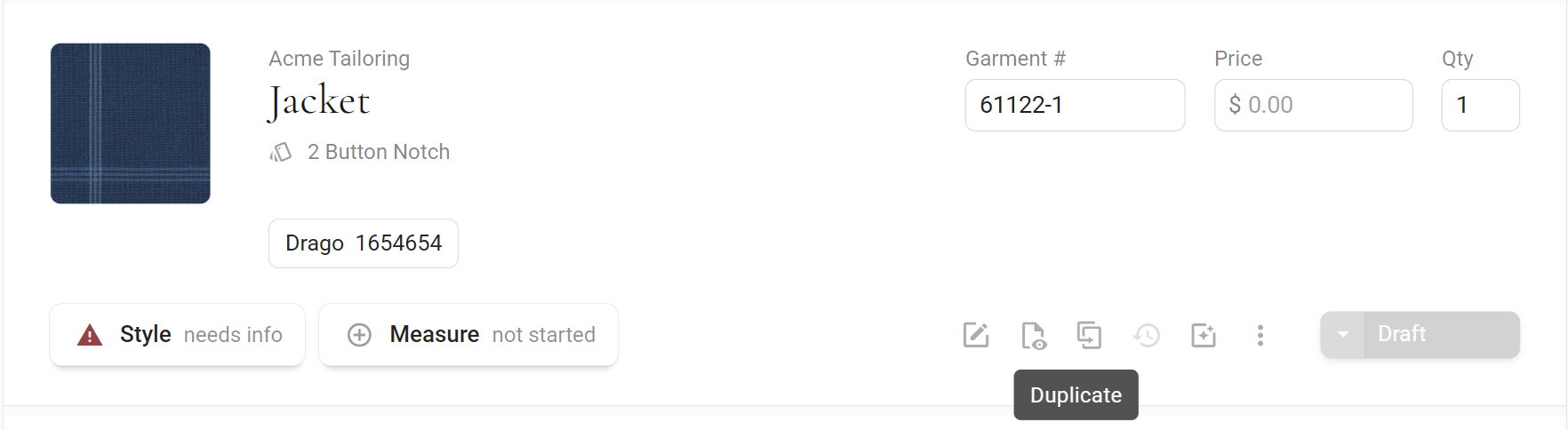
Duplicate is on the order page only. The Garments screen and the customer's Wardrobe have no copy button.
Duplicate a garment
- Click Duplicate on the row The Duplicate Garment window opens.
- Choose the fabricDifferent Fabric leaves the fabric off the copy so you can choose a new cloth. Same Fabric copies the fabric details across. Different Fabric is picked the first time you open the window on a garment. After that, while the order stays open, the window keeps the last choice you made for that garment, so check which one is picked.
- Set the Quantity How many copies to make. Use minus and plus, or type a number. It starts at 1.
- Click Duplicate The copies are added below the original, as drafts. Cancel closes the window without copying anything.
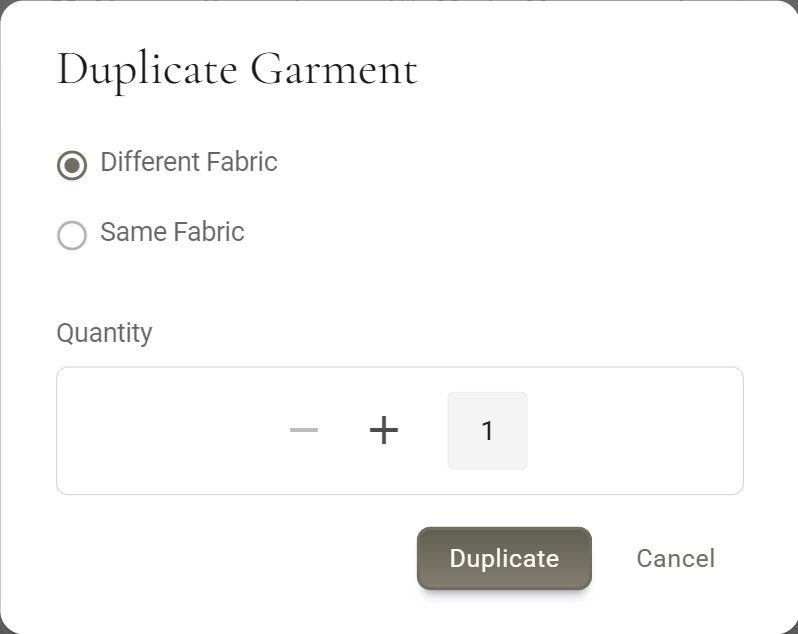
Then fill in what is new. With Different Fabric, the copy's fabric chip reads Select fabric. If the manufacturer requires fabric details, the copy's Style chip reads needs info until you add them. Set the price on the copy too, since it is not copied.
On an order more than 30 days old
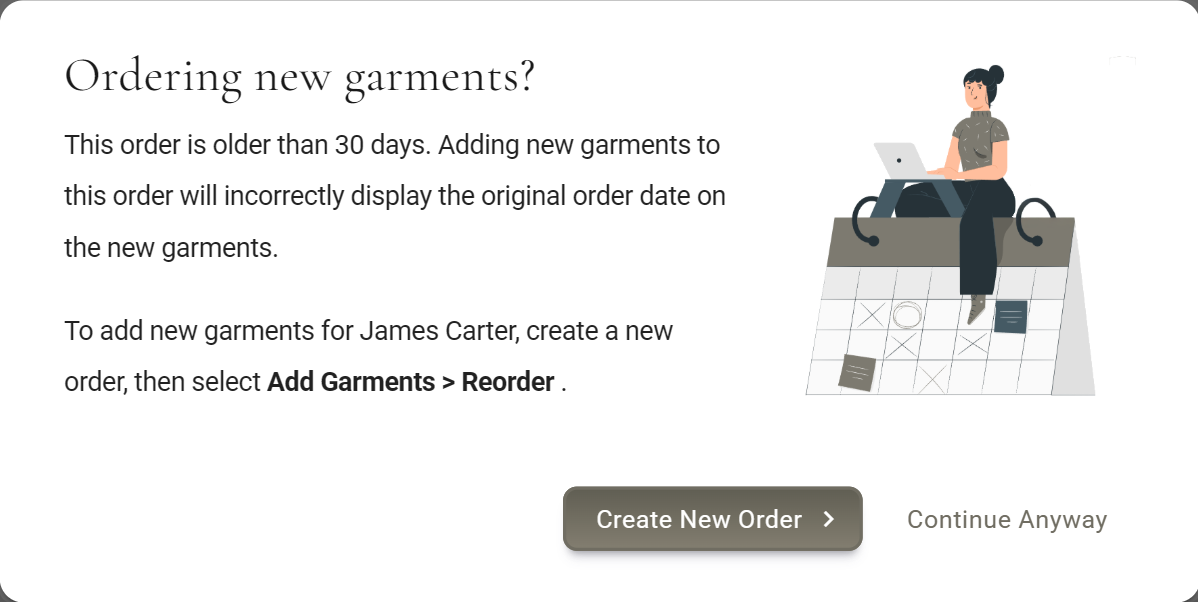
Duplicate first asks Ordering new garments?, because a garment added to an old order shows that order's date. Continue Anyway opens the Duplicate window on this order. Create New Order opens a new, empty order for the same customer; the garment does not come with it, so bring it across there with Reorder, under Add Garments. Reorder brings the style but not the fabric, which you choose again. To keep the fabric as well, use Replicate there instead, if your plan includes it, and search for the same customer: their own garments come up with their fabric.
One piece of a suit
A garment made of several pieces, such as a suit, gets an extra choice on the left of the window: the whole garment, or one piece of it on its own. The pieces are listed by name with Only after them, such as Jacket Only and Trousers Only. The whole garment is picked to start with.
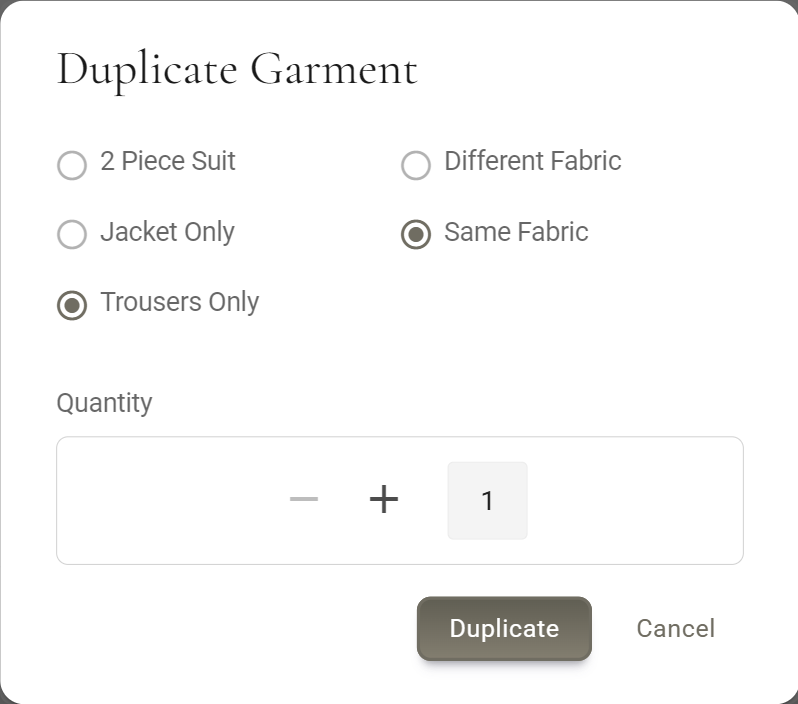
Pick a piece and the copy is that piece alone, from the same manufacturer, with only that piece's style answers. The fabric length is left empty, so you can enter the length that piece needs.
This needs your shop to have an order form for that piece on its own, from the same manufacturer, in Manufacturer Settings, opens in MTMPRO. Without one, an error appears and nothing is added.
What the copy brings
Copied from the original
- Style Every style answer, and the design photos. The Style chip starts where the original's is, unless a required fabric detail is now missing.
- Fabric, with Same Fabric The supplier, fabric number, description, photo and length of each fabric on the garment. For one piece of a suit, the length is left empty.
- Edit InfoPrevious Garment No., Retailer Need-By, Rush Order, Customer Need-By, Ship to Customer, Remake, Mfr Ref No., Order Conf. No., Order Conf. Date, Est. Shipping Date and the fitting checkbox (Try-On Fitting, Rag Fitting or Basted Fitting), where the garment has one.
Not copied
- Measurements Measurements belong to the customer, not to the garment. The copy shows the customer's measurements as they are today, on the same fit profile as the original.
- Garment No. A new number when the manufacturer uses Automatic Garment Numbers, otherwise blank for you to fill in.
- Price and Qty The copy starts with no price and a Qty of 1.
- Fabric, with Different Fabric Left off, ready for the new cloth.
- Status Every copy starts as a draft, whatever the original's status. Nothing is sent and nothing is locked.
- Everything else that belongs to the original Its AI renders, fabric POs and status history stay with it.
Copying a sent garment
A garment that has been submitted or locked can still be duplicated. The original stays exactly as it was sent. The copy is a new draft on the same order, which you can change and send like any other garment.
The style answers come from what was locked. The measurements do not: the copy is not locked, so it shows the customer's measurements as they stand today. If they changed at a fitting since the original went out, the copy has the new numbers. Check them before you send it; the measurement history shows what changed.
Now and then a locked garment cannot be copied. MTMPRO then says Action not supported and adds nothing.
Reorder, Duplicate or Replicate
MTMPRO has three ways to make a new garment from one that already exists. They differ in where you start, whose garments you can copy and whether the fabric comes along. None of them copies measurements: the new garment shows the measurements you keep for the customer on its order, as they are today.
| Reorder | Duplicate | Replicate | |
|---|---|---|---|
| Where you start it | Add Garments on an order, then the Reorder tab. Aria can do it too. | The Duplicate icon on a garment's row on the order. | Add Garments on an order, then the Replicate tab. |
| What you copy from | This customer's garments, from this order and the orders before it. | The garment you clicked. | Any customer's garments, from any of their orders. You find the customer by name. |
| What it copies | The manufacturer, garment type and every style answer. | The manufacturer, garment type and every style answer, with Est. Shipping Date and Mfr Ref No. The fabric too, if you pick Same Fabric. | The manufacturer, garment type, every style answer and the fabric. |
| What it does not copy | The fabric, which you choose again. Est. Shipping Date and Mfr Ref No. start empty. | The fabric, unless you pick Same Fabric. Different Fabric is picked the first time; after that, the last choice you made for that garment. | Est. Shipping Date and Mfr Ref No. start empty. |
| Whose measurements | This customer's, as they are today. | The same customer's, as they are today. | Those of the customer on this order, not the customer you copied from. |
| Whose order the new garment goes on | The order you have open, for the same customer. | The same order as the original, below it. | The order you have open, for its customer, whoever wore the original. |
| What you end up with | A new draft garment for each one you count, ready for its fabric. A suit comes across whole. | As many new draft garments as you set under Quantity. For a suit, the whole suit or one piece of it. | A new draft garment for each one you count, in the original's fabric. A suit comes across whole. |
| Who can use it | Owners, admins and associates, on every plan. | Owners, admins and associates, on every plan. | Owners, admins and associates, on the Premier, Scale and Concierge plans and during the Free plan's 30-day Premier trial. Not on Business. |
All three make new garments of their own, and the original keeps its style, fabric and status. Each new garment starts as a draft, and nothing goes to the manufacturer until you send it. Price and Qty are not copied, and the garment number is filled in only when that manufacturer numbers garments automatically for your shop. Edit Info details such as the need-by dates, Rush Order, Remake and Ship to Customer come along, so check them on the new garment. A garment that was already sent can be copied too: the copy starts from the answers as they were sent. On the Free plan, every copy counts toward your 10 garments a month.
Which one to use
- The same suit in a new cloth James Carter wants the navy suit you made him in the spring again, this time in grey flannel. Start a new order for him and use Reorder. The style comes across, you choose the grey cloth, and the suit is made to his measurements as they are today.
- More of a garment already on the order Daniel Reyes is ordering a white shirt today and wants the same shirt in blue and in pink. Use Duplicate on the white shirt, pick Different Fabric and set Quantity to 2. The two copies are added below it, each ready for its own cloth.
- A spare pair of trousers Peter Lang's suit is on today's order, and he wants a second pair of trousers in the same cloth. Use Duplicate, pick the trousers on their own and Same Fabric, then fill in the fabric length, which is left empty for a single piece. This needs an order form for those trousers on their own from the same manufacturer.
- The groomsmen's suits Michael Hale is a groomsman and needs the suit the groom, Tom Becker, ordered, in the same cloth. Open Michael's order and use Replicate: search for Tom and pick his suit. The style and the fabric come across, made to Michael's measurements.
- Exactly the same again Ana Morales wants last year's trousers again in the very same cloth. Reorder would leave the fabric for you to choose again. If your plan includes Replicate, open her new order and search for Ana herself on the Replicate tab: her own garments come up with their fabric. If not, use Reorder and pick the same cloth again.
Good to know
- One garment at a time Duplicate works on one row, however many copies you ask for. To bring back several of a customer's garments at once, use Reorder, or Replicate to bring their fabric too.
- Nothing is sent Copies wait as drafts until you send them with Check and Submit.
- Made one too many? A copy is a draft, so Delete in its three-dot menu removes it.
- Every role, every plan Owners, admins and associates can all duplicate. On the Free plan every copy counts toward your 10 garments a month: the Duplicate icon greys out once you reach 10, and the plus button stops at what is left. A number typed into the box is not checked, so make sure it fits before you click Duplicate.
- Rows can move Duplicate can shift the rows near the top of the order: the garments above the original can change places, and another garment can end up between the original and its copies, or between the copies. Drag the rows back into place if their order matters.
- Slack If your shop posts new garments to Slack, copies are posted as duplicated on the order.
More: Reordering Garments · Replicating Garments · Placing an Order · Fit Profiles · Garment Statuses