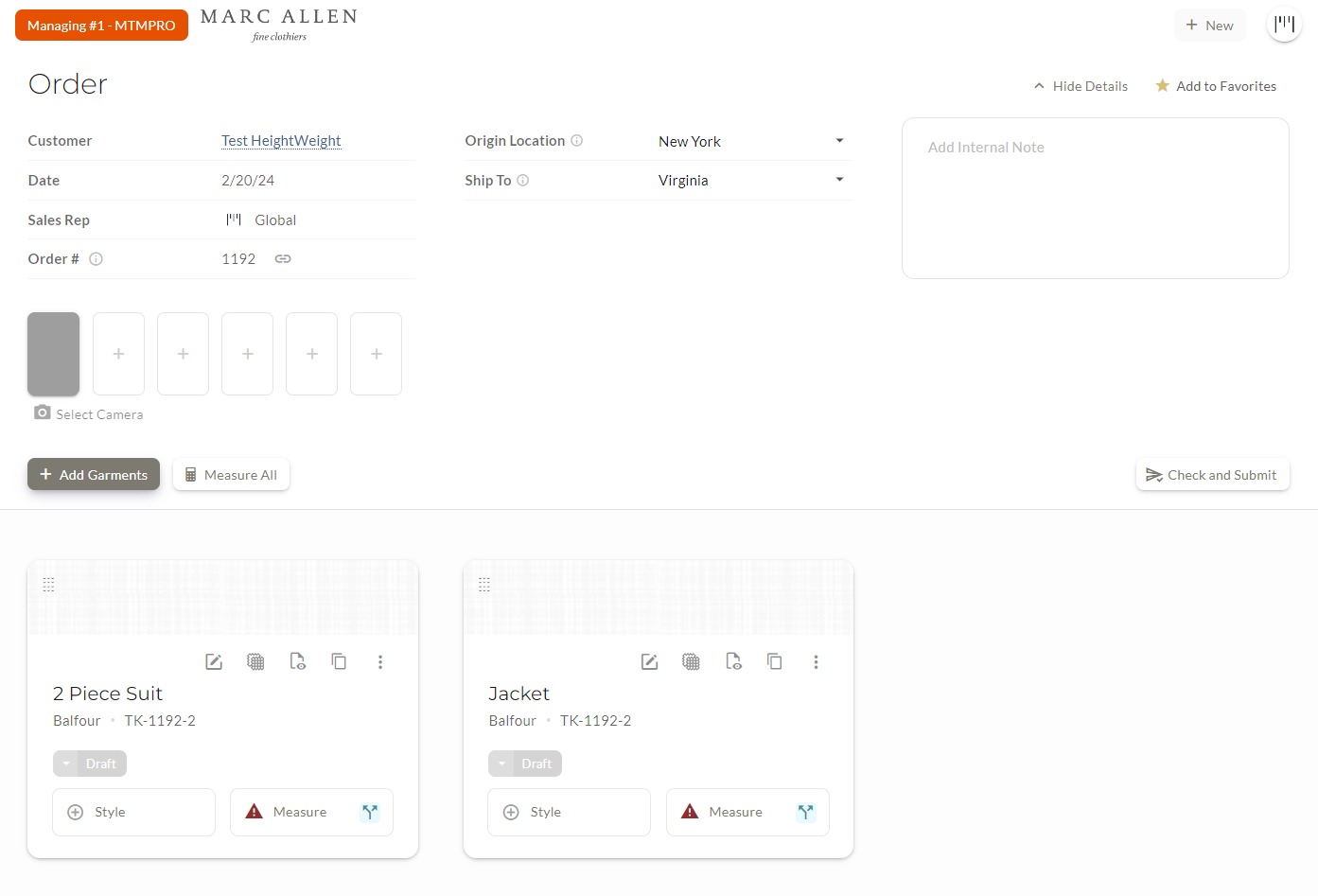
Generate new MTM and bespoke garment orders in two minutes or less. Improve consistency and accuracy with innovative and highly-specialized tools.
Send Orders Anywhere
Submit orders to your operations staff or directly to your manufacturers via email. Quickly move data into manufacturer portals with excel sheets or built-in interface.
Customized Export Formats
submit and export orders as beautifully formatted Excel or PDF orders, automatically compiled with photos of your customer and selected fabrics.
One-Click Reorders
Copy previous orders from your customers’ order history. MTMPRO automatically updates the fabric, and appends the most recent set of measurements.
Replicate Any Customer's Garment
Premier
Have you ever prepared a garment for pick up, only to have another customer ask if you can make them one "just like it"?
Create new orders based on the style and fabric selection of another customer's garment. MTMPRO automatically prepares the fabric purchase order, and appends the correct customer measurements to the garment.
Style Templates
Create dynamic style templates, with optional locked-fields, generating orders for your most popular styles in a fraction of the time.
Completion Indicators
Real-time indication of your order progress, with proprietary tools to pinpoint and address missing information.
Onboard Cameras
Take photos of customers directly inside the app. Automatically generates customer profile headshots, and attaches profile photos to finished orders.
Product Catalogues
Presentations for your unique product styles. Option to instantly add a catalogue item to any order with custom style presets.
Product Catalogues
Visual guides for presentations and to reduce order errors.
Split Separates
Instantly split 2 and 3 piece suits into individual jackets, vest, and trousers with different or matching fabric.
Touchscreen Order Forms
Built to move fast with touch. Auto-progressing forms. Enhanced touch targets. 1/8 inch keypad.
Order Generation
Frequently Asked Questions
Is this designed for a tablet? Yes, MTMPRO is designed to be customer-facing, and is touchscreen enabled to style garments and measure customers with special touchscreen tools. MTMPRO also runs on desktop and mobile phones.
Does this integrate with my manufacturer portal? There are 3 ways that MTMPRO can submit orders to a manufacturer. 1. Submit and track orders using MTMPRO's dedicated manufacturer portal (manufacturer participation required). 2. Email the finished order as a PDF or Excel sheet with customer and fabric photos appended. 3. Use the built-in notification system to let your back-of-house staff know to review and process the order.
Can I customize the finished PDF layout? Yes. MTMPRO includes a powerful order-form builder, which allows you place different field types in custom sequences, and is reflected on your finished orders.
Is there a an internal review process before submitting orders? Yes. MTMPRO comes with a built-in workflow tool to send a notifications to specific users, and mark the garments as ready to review, before being submitted.
Measurements
Enjoy an innovative and streamlined experience designed to capture any type of measurement in real-time, with minimal effort and total precision.
Connected Measurements
Enter a customer's measurements once to have them instantly copied to their vest, shirt, or any other garment from any other manufacturer.
Automatically copy measurements and posture assessments across different garments and manufacturers, so you only have to enter them once.
Master Measurement Set
Premier
A custom measurement form, independent of any manufacturer, that can be automatically copied other garments in the system.
Custom Tabs
Create custom tabs that instantly switch between skin, finished, or try-on size measurements. Tabs have a variety of uses and can be customized any way you need them.
Custom Try-On Sets
Create full sets of customized try-on sizes that can be dialed-in with simple adjustments. View the final calculations on the finished order.
Max and Min Boundaries
Set custom boundaries for any measurement. Get instant feedback when a measurement is outside your acceptable range, preventing costly errors.
Fit Profiles
Create multiple sets of measurements for the same garment type for any customer. Save a 'default' profile and specific profiles like 'slim sport coat' to vary the fit. MTMPRO automatically highlights variations from the default fit.
Custom Measurement Sequences
Drag and drop garments to match your measuring routine. Set it once and MTMPRO remembers your preference for future use.
Allowance Templates
Standardize allowances across your garments. Create custom templates for specific fits (e.g., 'Slim' or 'Classic'), ensuring consistency and reducing errors for every garment type.
International Unit Conversions
Capture and export measurements in your preferred units of measure. Automatically convert measurements across manufacturers.
Custom Try-On Sets
Create full sets of customized try-on sizes that can be dialed-in with simple adjustments. View the final calculations on the finished order.
Best-In-Class Measurement History
Proudly the most robust measurement tracking feature in the industry. Track every customer measurement change over time, including the previous values, the user that changed them, and when.
Inline Measurement Notes
Optionally add measurement notes next to each measurement value as you go.
Measurements
Frequently Asked Questions
Does the system automatically add the measurements for reorders? Yes. Measurements on previous orders can always be referenced exactly as they were at the time they were submitted. However, the customer's measurements are a “living” record that can be updated at any time, and will automatically be added to all the customer's newest orders.
Are the measurements different for each manufacturer? Yes. Measurements for each manufacturer are their own unique data points. Manufacturers may require different layouts or values depending on how their garments are constructed. Use the Connected Measurements feature (see above)
Can I use the same try-on set for multiple manufacturers? Many retailers use proprietary blocks or try-on sets. Whether this is your case, or your manufacturer provides standard stock sizes, MTMPRO can accommodate your try-on garments in a flexible and robust way.
What happens if I alter the garment for the customer? After the alteration, simply update the measurements in MTMPRO, and the system will automatically use the latest measurements on the customer's next garment. Alteration instructions and measurements are intentionally kept separate. Consider how many measurements can potentially be the cause of an alteration like "pad left shoulder", "shorten collar" or "lower waistband".
Order Tracking
Accurately maintain oversight on orders across all of your manufacturers. Daily automatic updates provide the peace of mind that orders are processed and arrive on time without interruption.
Custom Production Statuses
Premier
Track garments with your own list of custom statuses. Control the names, colors, sequence, and formatting of your status list.
Status Timers
Ever wonder how long an order has been sitting unfinished? How long a garment has been in production? Timers give you granular control to remind you of when things should be moving.
Add custom timers for each status. Add separate timers for different garment types and manufacturers. Receive notifications when timers expire, and view your expected due dates on a monthly production calendar.
Meta Data
MTMPRO gives you a dedicated space for supplemental information that's helpful for tracking your orders. Save customer need-by dates, manufacturer confirmation numbers, and much more.
Custom Filters
Create and save powerful, customized filters to reference garment lists that you use the most. Filter by sales rep, fabric suppliers, locations, statuses, and much more.
Visual Timelines
History on every garment, tracking its progress with notes, dates, and employees.
Production Calendar
View upcoming customer need-by dates, production due dates, and delivery timelines across all orders in one centralized calendar.
Group Tracking
Create and track garments in groups for wedding parties, trunk shows, sports teams, on-site sales, or anything else you need it for.
Order Tracking
Frequently Asked Questions
Can I export a list of my orders? Yes. You can export lists to a downloadable Excel file.
Does MTMPRO track fabric orders? Yes. Fabric orders can be generated using the MTMPRO system, with in-app confirmations from your suppliers displayed in the application.
Are garment statuses automatically updated from my manufacturer portals? MTMPRO automatically tracks some statuses such as drafts, review requests, order submissions, and alterations. In some cases, production and shipping statuses can be automatically updated if the manufacturer uses the MTMPRO supplier system (requires manufacturer participation). Additional statuses are reconciled across manufacturers by the retailer.
Workflow
Keep operations humming with added efficiency. Special tools allow provide comprehensive data management, alongside scalable solutions for growing your team.
Zapier Integration
Premier
A custom measurement form that automatically connects to all manufacturers on the system
Customer Data Import
Import all of your existing customers and contact details using Excel or CSV files.
Review Notifications
Premier
Mark orders to be reviewed by an administrator before being submitted. Designated administrators are notified through an in-app messaging system.
Document Management
Premier
Attach documents and supplementary information to any customer profile.
Wardrobe Summary
A visual summary of each customers' entire wardrobe. Organized by date and garment type, with fabric photos appended.
Alterations
Create printable alteration tickets with photographs and additional notes. A special touch-screen interface allows for real-time ticket generation.
Team Permissions
Control employee access to customers, functionality, and system administration.
Multi-Store Capability
Track employees, customers, and orders across multiple store locations. Notify your manufacturers to ship directly to retail stores, or a central receiving hub.
Blue Pencil Review with Photo Reference
Drag and drop garments to match your natural measuring routine. Set your flow once, and MTMPRO remembers it for future sessions.
Production Calendar
View upcoming customer need by dates, production due dates, and delivery timelines across all orders in one centralized calendar.
Group Tracking
Filter by groups and know where each garment of “Smith Wedding Party” (for example) is in production.
Workflow
Frequently Asked Questions
Can I import customer measurements? Due to the sensitive nature of this data, measurements must be entered directly into the system. This allows for additional verification and takes full advantage of the system's sophisticated measurement capabilities.
Does MTMPRO manage alterations for garments that customers bring in? Currently, MTMPRO does not offer the ability to generate or track alterations for garments provided by customers.
Fabric Ordering
Streamline fabric procurement directly within MTMPRO. Automate purchase orders, track supplier confirmations, and ensure the right materials arrive at your manufacturers exactly when they need them.
Automated Fabric Ordering
Generate and submit purchase orders to your existing fabric suppliers directly within MTMPRO. Receive in-app notifications when POs are confirmed by suppliers. Orders are automatically batched by supplier and destination, giving you the ability to add notes, hold fabrics, and adjust quantities on the fly.
Intelligent Shipment Routing
Cut international shipping costs by automatically routing fabric through custom transit hubs. Leverage strategic VAT and duty efficiencies tailored to your specific suppliers and manufacturers.
Unit Conversion
Automatically convert yards to meters and vice versa when ordering fabric from your suppliers.
On-Off Cuts
Quickly order one-off fabrics for parts, replacements, or specialty items. Add the separate cut to an existing PO, or separate it out in case of a rush or discreet processing.
Fabric Consumption
Automatically add preset fabric consumption quantities based on any manufacturer and garment type. Quantities can be adjusted by 1/8 yard or .01 meter increments.
Fabric
Frequently Asked Questions
Does your system automatically track shipments? No.
Are the measurements different for each manufacturer? Yes. Measurements for each manufacturer are their own unique data points. Manufacturer may require different layouts or values depending on how their garments are constructed. Use the Connected Measurements feature (see above)
Can I use the same Try-on set for multiple manufacturers? In addition to a live demo, you will have a personalized onboarding call to get started. MTMPRO also has in-app video tutorials and guided tours, with outstanding customer support.
What happens if I alter the garment for the customer? No. Customer support is included with every price tier. For retailers who receive a subscription through their manufacturer, we ask that support inquiries be initiated with the manufacturer.